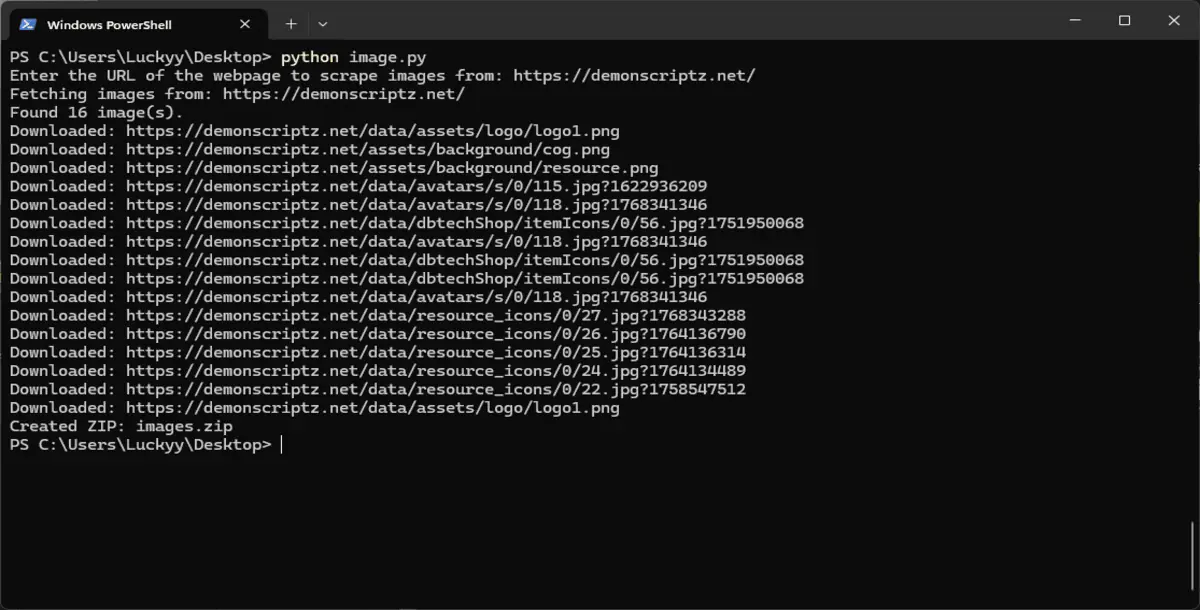
Easily extract and download all images from any public webpage with this lightweight Python tool. Designed for speed and simplicity, this script scans a target URL, collects all image sources, downloads them locally, and bundles everything into a ZIP file.
Perfect for developers, designers, marketers, and researchers who need quick access to website image assets without manual saving.
Key Features
Scrapes all <img> tags from a webpage
Resolves relative and absolute image URLs automatically
Downloads images in original quality
Auto-detects image file extensions
Saves images to a local folder
Automatically creates a ZIP archive
Simple command-line interface
Lightweight and easy to modify
No API keys required
How It Works
Enter the URL of a webpage
Script fetches the page HTML
Extracts all image sources
Downloads each image locally
Packages all images into images.zip
Requirements
Python 3.7 or newer
requests
beautifulsoup4
Install dependencies:
pip install requests beautifulsoup4 bs4
Run:
python image.py
Use Cases
Download images from landing pages
Extract blog or article images
Collect assets from portfolios
Create offline image backups
Research and reference gathering
Dataset creation for ML or AI projects
Content archiving
What You Get
Fully working Python script
Ready for extension or GUI wrapping
Notes
This tool only accesses publicly available image URLs and does not bypass authentication, DRM, or restricted content. Always ensure you have the right to download and use scraped images.
Published:
25-01-2026 07:11 PM
Category:
Compatible Platforms:
Files Included:
Technologies: